

How to Start an RPM Program: A Practical Readiness Checklist
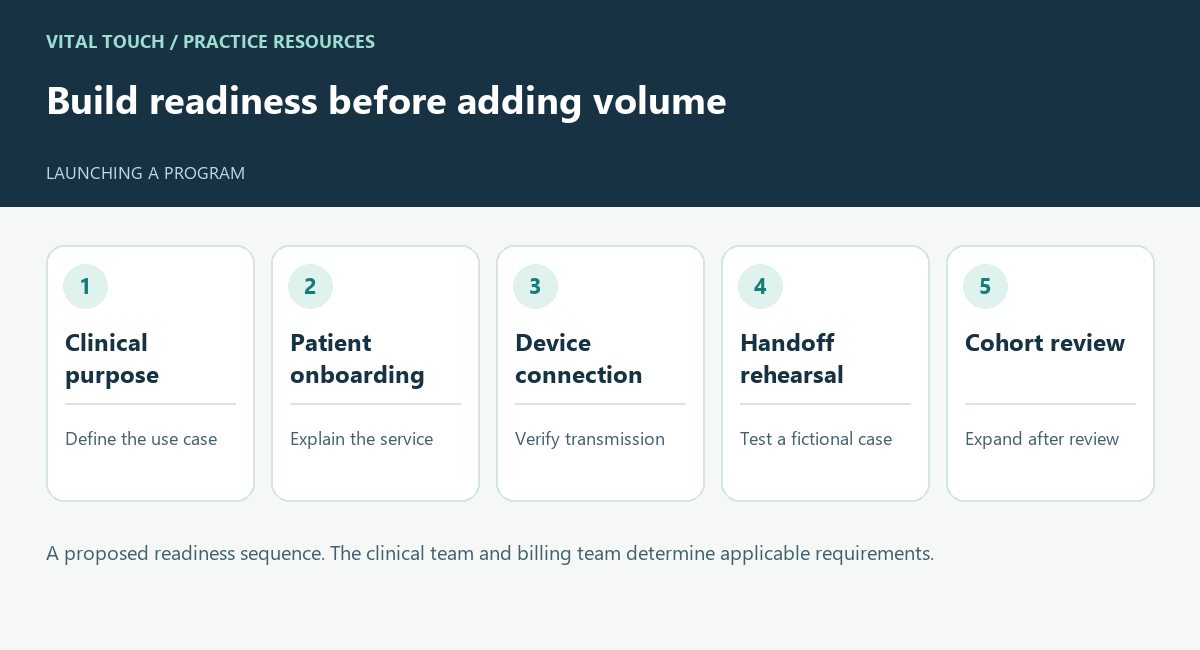
A proposed readiness sequence. The clinical team and billing team determine applicable requirements.
Starting an RPM program requires a workable path from patient selection to clinical follow-through. Devices and software are part of that path, but the practice also needs named owners, patient support, and a review process.
CMS describes remote patient monitoring as collecting health information through a connected medical device that automatically transmits it to the provider. Its overview identifies education and setup, device supply, and treatment management as core components. A launch checklist should connect those components to real people and tasks.
Define the clinical purpose
Ask your clinical lead what information the program should make available and how it will support care. Identify the patient population the team wants to evaluate, then have appropriate personnel confirm individual suitability and current program requirements.
Do not treat a diagnosis list as a completed enrollment decision. Your launch process also needs a way to explain the service, answer questions, and record required information.
Prepare the patient introduction
Decide who introduces the program and how the remote-care team is identified. Patients should know why they are being contacted, what participation involves, and where to ask for help.
Review explanations of possible patient costs with the billing team. Avoid promising that every patient will have the same coverage or financial responsibility. Give staff a clear route for questions they cannot answer.
Rehearse device setup and support
Choose a setup process the team can demonstrate. Confirm who verifies that the device is working and that transmitted information reaches the intended system.
Plan for a patient who cannot complete setup, has a connection problem, or needs additional instruction. Name the support owner and define how unresolved problems are reported to the practice.
Test the clinical handoff
Use a fictional scenario to rehearse an issue requiring clinician review. Confirm the communication route, acknowledgment, backup coverage, and documentation of the response.
Use the practice’s approved protocols. The rehearsal is a workflow check, not an invitation to invent clinical thresholds or treatment instructions.
Start with a cohort you can review
Select an initial scope your team can observe closely. Review setup completion, unresolved support issues, communication failures, and documentation readiness before expanding.
The cohort size and review period should reflect your practice’s capacity; there is no universal launch target in this checklist. Growth should follow evidence that the workflow is functioning.
Make the launch decision explicit
For a Vital Touch launch, the documented onboarding process begins with the sales intake, executed agreements, practice information, and required billing setup. The kickoff aligns roles, patient outreach, clinical escalation routes, and the launch timeline. Required access and provider information should be complete before the program is treated as billing-ready. Record unresolved items and the person who must close them.
For a practice seeking external operational support, Vital Touch’s service overview provides a starting point for discussing how those responsibilities would be shared.
